

Whoa!
A different format?
You might have noticed that this page looks different from the others. Don’t worry, I haven’t lost my attention to detail, I’m just making incremental updates. Thanks for understanding.
Case Study: Selecting an Airplane
Summary
This case study walks through my end-to-end design process, from research and problem framing through iteration, validation, and final mockups. The work took place during an on-site Customer Advisory Board workshop, where I collaborated directly with airline maintenance teams from 17 airlines to address a critical interaction flaw. A feature that initially received 0% positive feedback was redesigned through this process and ultimately achieved 79% positive approval, improving usability, restoring trust, and supporting safer decision-making in a critical maintenance tool.
Description
Maintenance Performance Toolbox (Toolbox) allows maintenance staff to view technical and performance data for individual aircraft and, in many cases, serves as the primary interface for accessing fleet maintenance information. To ensure accuracy, users must first select a specific airplane, which scopes the data shown across the application and hides information that does not apply to the selected airplane.
This case study centers on improving that airplane selection experience based on direct feedback and observation gathered during the Customer Advisory Board workshop.
Problem
Prior to the redesign, the Select an Airplane interaction behaved inconsistently across Toolbox’s multiple tabs. For example: The interface suggested that an airplane selection applied globally, it did not. The interaction required different steps depending on the active tab, appeared inconsistently, and was difficult for users to understand.
More importantly, this inconsistency introduced real risk. Because the selected airplane was not reliably reflected across the application, users could unknowingly view incorrect technical data when performing maintenance-related tasks. This undermined trust in the system and had the potential to impact safety.
“Aryk has a rare ability to look at an application or system and immediately understand what it should be. I’ve seen him both elevate existing products and build new ones from the ground up, guiding them into form with confidence, speed, and excellent judgment.”
Research
This problem was already well known prior to the workshop, having surfaced repeatedly through customer complaints and product enhancement requests. The on-site customer workshop provided an opportunity to validate and prioritize the issue alongside users, where a feature usage survey as the feature with the lowest approval ratings.
The research approach focused on building shared understanding and uncovering root causes. We examined the issue through live walkthroughs of the existing product, facilitated discussion, scenario-based user observation, and structured likes and dislikes exercises. This allowed us to move beyond anecdotal feedback and clearly identify where and why the experience was breaking down.
Survey with 0% approval (green) and 73% disapproval (red) for Select an Airplane
Airline attendees participating in a Likes/Dislikes exercise
Design
Following the Select an Airplane discussion session, I sketched multiple solution concepts that fit within the existing design paradigm. The goal was to have something tangible to review with customers the following day, allowing us to validate direction early while the context was still fresh. Through this exploration, two primary interaction flows emerged: one using a dedicated widget on the dashboard, and another accessed through an icon in the global header.
After reviewing the sketches with power users and incorporating their feedback, I translated both approaches into low-fidelity wireframes that evening. This allowed us to compare the two flows side by side during the workshop, validate assumptions with real users, and confirm which direction best supported clarity and consistency before moving into higher fidelity design.
A sketch of a Dashboard widget workflow
A sketch of a header bar workflow
A wireframe from the Dasbhoard widget workflow
A wireframe from the header bar workflow
Concept Validation
The following day, I reviewed both potential workflows with workshop participants using the low-fidelity wireframes. Airline attendees discussed what worked, what didn’t, and why, with feedback captured in real time using our established workshop process.
We then conducted a structured comparison of the two concepts, effectively running an A/B evaluation with the group. Of the 17 airline participants in attendance, 16 preferred the same design direction, giving us a clear signal on which approach best supported clarity, consistency, and usability before moving forward.
Me talking with a workshop attendee
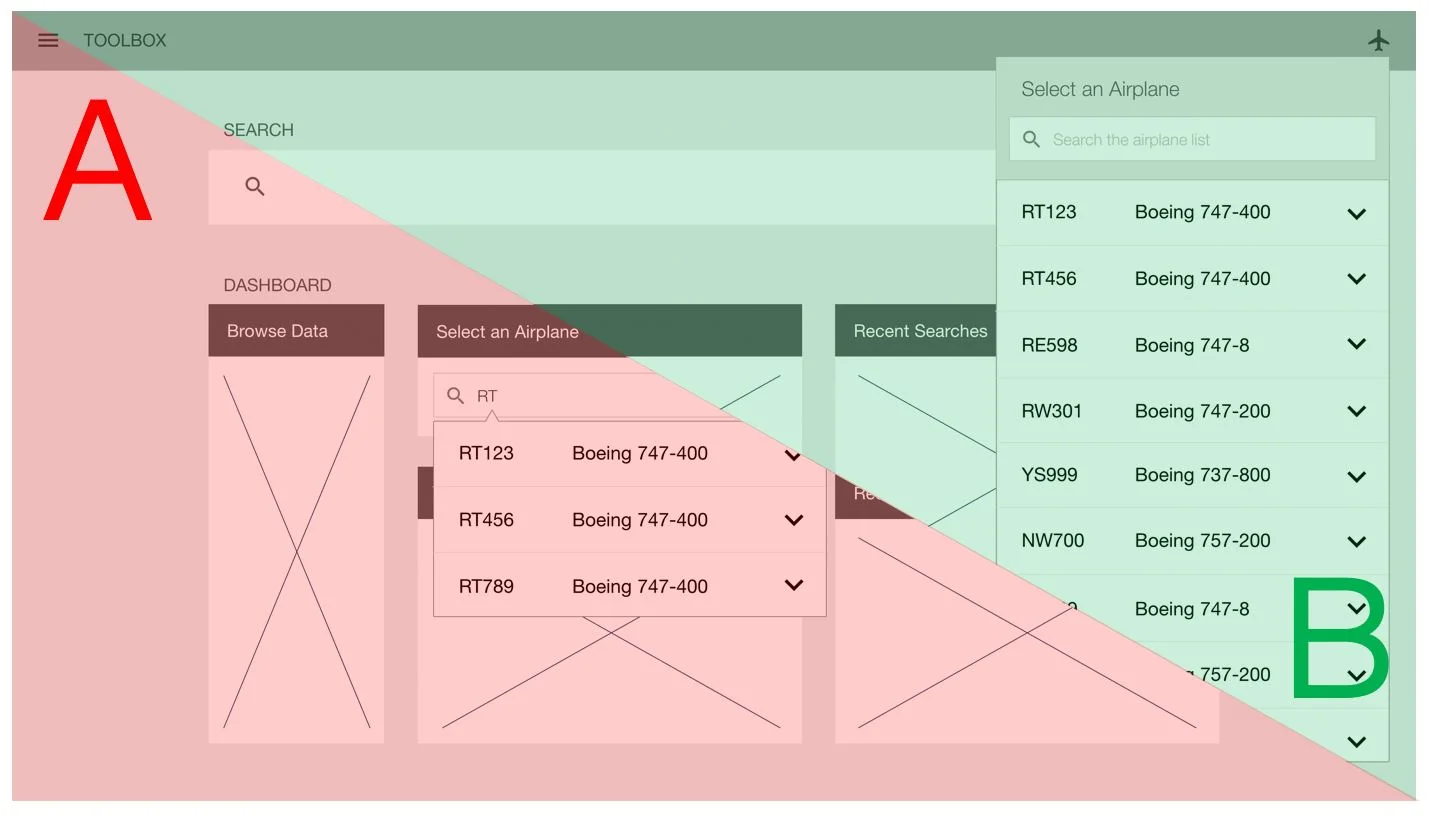
A/B Testing different design directions
Iterate
After the on-site workshop but prior to development, I revisited the wireframes and feedback gathered during the Customer Advisory Board sessions to inform the first round of high-fidelity mockups. The goal was to translate the validated direction into a more complete design while preserving the decisions that had already been reviewed with users.
I presented these mockups during our monthly Customer Advisory Board call, walking participants through the updated interaction and flow. Following our established feedback process, each participant shared structured input in the form of likes and dislikes, along with additional context. This feedback directly informed subsequent refinements before the design moved into development.


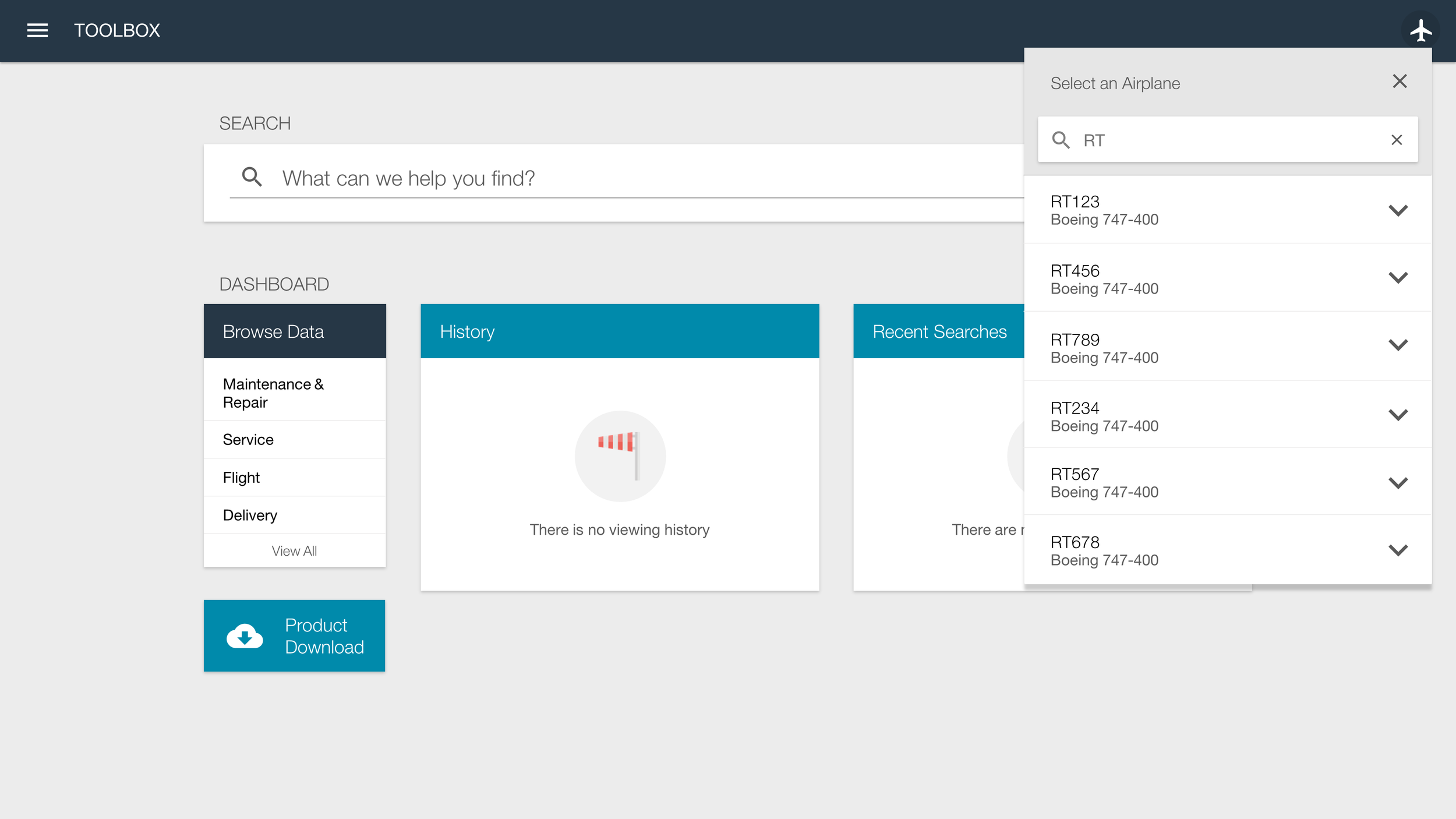

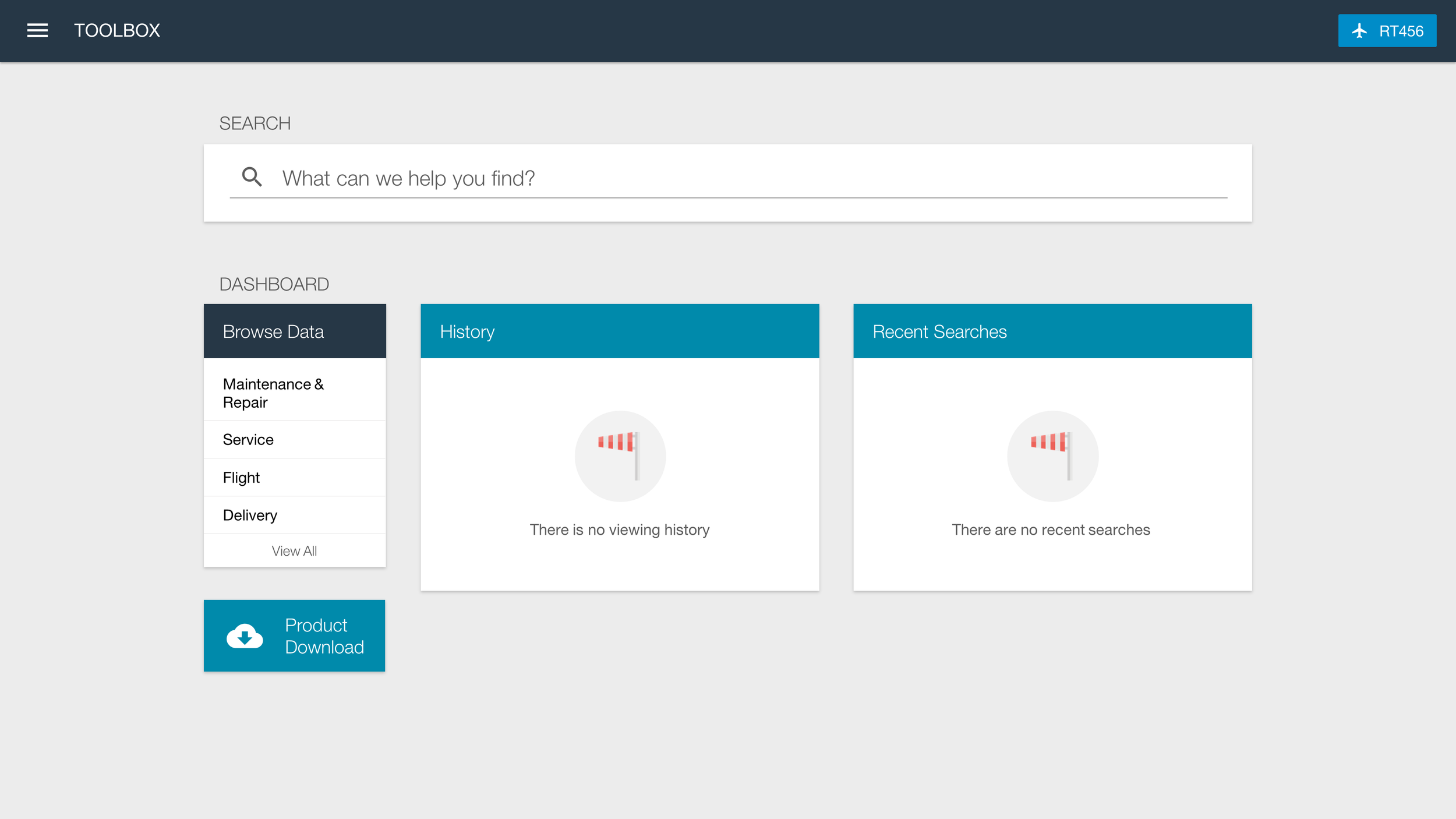
Feedback from the Mockup Review
Likes
Simple, clean, intuitive design
Always available in the header
Very few steps to select airplane
Airplane list is searchable
Users can always see selected airplane
Dislikes
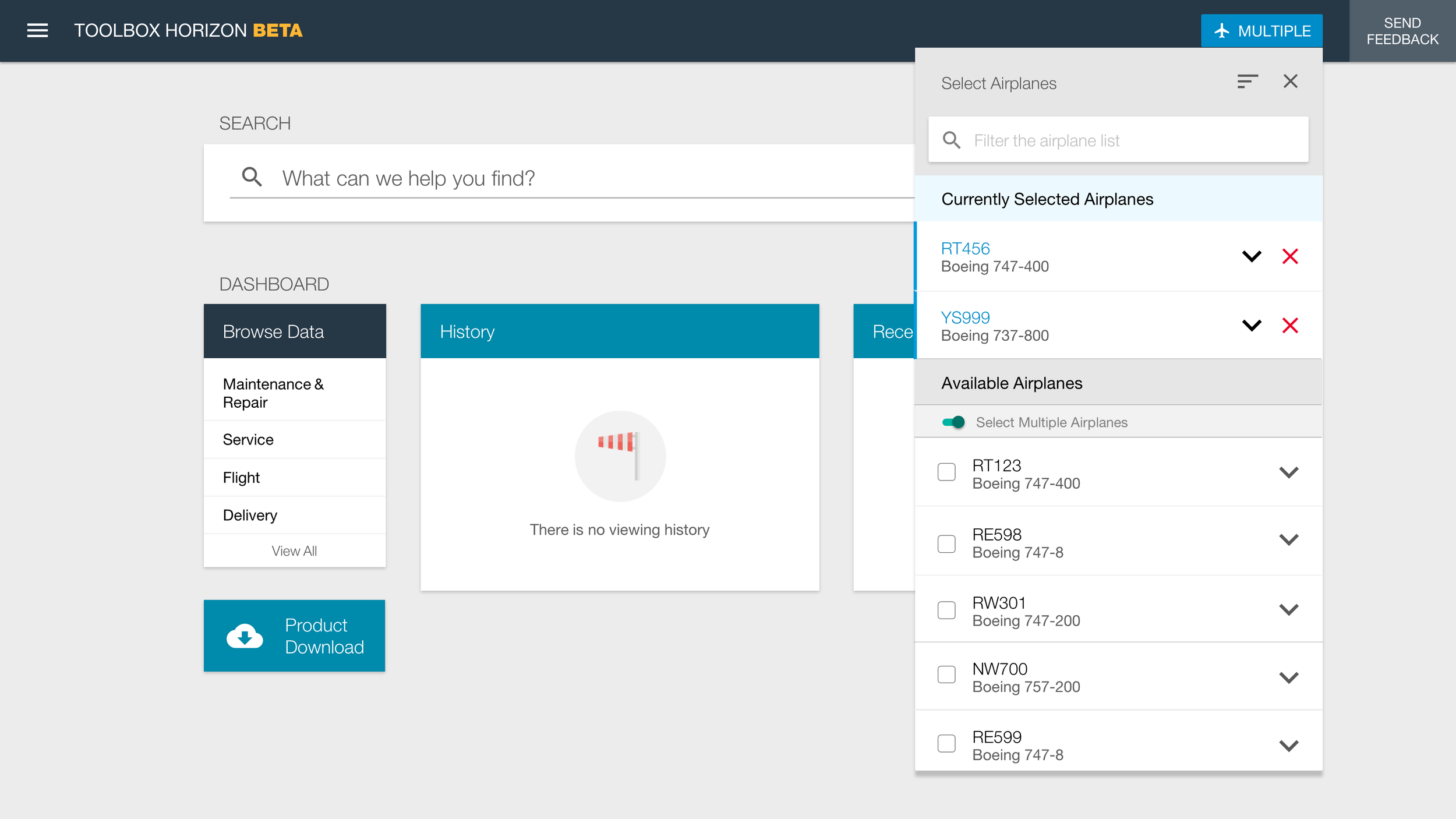
No support for selecting a range of airplanes
No ability to select multiple airplanes
No customization to change the airplane ID type
No ability to sort the list
Review
Before development began, I created a final iteration of the mockups that incorporated the majority of customer feedback, including support for multi-select airplanes, sorting, and updating airplane identifiers. The goal at this stage was to confirm that the design reflected what we had learned and resolved the remaining points of friction.
I reviewed these final designs with customers during the next monthly customer call, shared them through the project newsletter, and walked through them during on-site visits. Where appropriate, I converted the designs into clickable prototypes so users could experience the interaction flow directly. This final round of review helped ensure alignment and confidence before the design moved into implementation.




Talking with end users during an on-site research trip
Preparing user testing scenario with a prototype
Deliver
Once the designs were finalized, I prepared detailed redlines*, updated the online style guide, and partnered closely with the front-end development team to build a functional prototype. These materials were packaged and reviewed with the back-end engineering team during sprint planning to ensure shared understanding and smooth implementation.
From there, the solution was integrated into the production version of the product, completing the transition from user feedback to validated design to shipped functionality.
* I don't have the redlines for this mockup, another example provided.
Redlines from an iteration of the Browse Data design
We built an web style guide for developers
Results
Before the redesign, the Select an Airplane interaction received 0 % positive feedback, making it the lowest-rated feature discussed during Customer Advisory Board sessions. After implementing the redesigned interaction using the process outlined in this case study, customer advisors reported 79 % positive feedback.
Beyond the metric itself, the shift reflected increased confidence in the system and reduced confusion around aircraft selection in a critical workflow. The redesign transformed a high-risk, low-trust interaction into one that users understood and supported.